Niravah in short
Niravah is your notebook in photos and words, for noticing what truly matters, keeping it, and revisiting it. Here are plain answers to the questions people ask most, from price to privacy.
What Niravah is
What is Niravah?
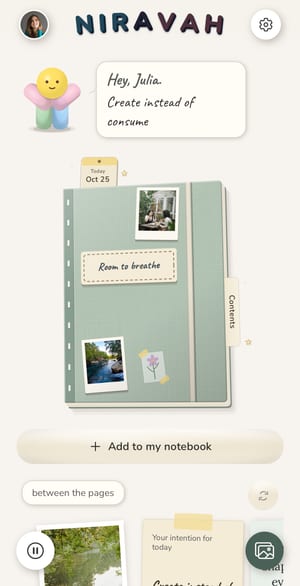
- Niravah is a notebook app in photos and words, for noticing what truly matters, keeping it, and revisiting it. You keep a page for the days you want to remember, with the photo you choose, a few words, a place and a person, and leaf through your notebook like an album. Over time, older memories come back to you on their own, and the Pause gives you a few calm minutes whenever you like.
Is Niravah a journal or diary app?
- Yes, Niravah works as a private photo journal or diary, shaped like a notebook. Each notebook holds your day pages, a journal for longer writing, your photos, your places and your wishes. Many people also use it as a travel journal for a trip.
Who is Niravah for?
- Niravah is for anyone who wants to keep the moments that matter in photos and words, without pressure or performance. You can keep one notebook for a season, a trip or a time of your life, and come back to it whenever you like.
Which devices does Niravah work on?
- Niravah works on iPhone, iPad and Android phones. There is no computer or web version for now.
Which languages is Niravah available in?
- Niravah is available in English and French. The app follows your phone's language, and uses English for any other language.
Price
Is Niravah free?
- Yes, Niravah is free to download and free to use, with no time limit. The free version is the full notebook, so there is no trial to start or run out. Niravah Premium is optional.
What does Niravah Premium include?
- Niravah Premium removes the ads and adds new notebooks, more ways to customize your covers and pages, online photo backup, voice dictation and unlimited countdowns. Writing, your pages, the app lock, sync of your pages and words, export and sharing all stay free.
How much does Niravah Premium cost?
- Niravah Premium costs €6.99 a month, €54.99 a year, or €129.99 once for life, with the same numbers in US dollars. The monthly and yearly plans renew automatically and can be cancelled anytime in your App Store or Google Play settings. The price shown in your store is the one that applies and can vary slightly by country.
Are there ads in the free version?
- Yes, the free version shows a few ads to keep Niravah independent, never on your day's page or where you write. Niravah Premium removes them.
What happens if I stop Premium?
- Nothing you made is deleted. Every notebook stays readable, your covers stay as you made them, photos already backed up stay in the cloud and can still be restored, and your pages and words keep syncing for free. New photos are no longer backed up online, and ads come back.
Privacy and data
Do I need an account to use Niravah?
- No, Niravah works fully without an account, and your notebook stays on your phone. An account is only needed for the optional online backup and sync, and it uses just your email and a 6-digit code, no password.
Where are my pages stored?
- Your pages, words and photos are stored on your phone. Nothing is copied online unless you turn on the optional backup, so without a backup or a backup file, a lost phone means a lost notebook.
Is my backup encrypted, and where is it hosted?
- Yes, the optional backup is encrypted before it leaves your phone and hosted in Europe. By default, Niravah keeps the key that opens it in secure key management, so we can help you back in through your email if you're ever locked out; this also means we could technically open your backup, and we never read or use your pages. On a phone with a screen lock, you can instead choose to manage recovery yourself, a choice that can't be undone: your backup then comes back only with your recovery kit, or through your phone's secure keychain on the same Apple or Google account, and if you lose them, even we can't bring it back. Niravah never sells your pages and never uses them for advertising.
Can I lock Niravah with a passcode?
- Yes, you can set a passcode, with Face ID or your fingerprint if you like, so the app stays closed when someone else picks up your phone. The app lock is free. Step by step: How to lock Niravah with a passcode
Can I export my data?
- Yes, and export is free. "Download my data" gathers everything on your phone, photos included, into one .zip file you can keep anywhere. You can also create a backup file sealed with a passphrase: we never receive the file or the passphrase, so if the passphrase is lost, no one, including us, can open it.
How do I delete my account and data?
- You can delete everything from Niravah's settings: with an account, this erases your account, your online backup and everything on the phone; without one, it erases everything on the phone. You can also ask from niravah.com/account-deletion.
Sync and backup
Is my journal synced across my devices?
- Yes, for free: if you turn on backup, your pages and words sync across your devices, iPhone, iPad and Android alike. Backing up photos is part of Premium. Step by step: How to back up Niravah and move to a new phone
Are my photos backed up?
- Online photo backup is part of Niravah Premium. In the free version your photos stay safely on your phone, and you can still take them to a new phone with a backup file or "Download my data". Step by step: How to back up Niravah and move to a new phone
How do I move Niravah to a new phone?
- Sign in with the same email on your new phone and your pages and words come back, along with your photos if photo backup was on. If you chose to manage recovery yourself, your new phone also asks for your recovery kit, unless it can use your phone's secure keychain on the same Apple or Google account. Without an account, create a backup file on your old phone and open it on the new one: it carries everything, photos included, sealed with a passphrase we never receive. Step by step: How to back up Niravah and move to a new phone
Using Niravah
How many notebooks can I have?
- The free version gives you one notebook that keeps growing for as long as you like. With Premium you can begin a new notebook for a season, a trip or a time of your life, and every earlier notebook stays readable for everyone. Naming your notebook is free. Step by step: How to start a new notebook in Niravah
What can I put on a page?
- A page holds the photos you choose, a few words, a place, a person and mood words. The free version and Premium allow the same number of photos per page, and a place is only added from your location if you allow it. Step by step: How to keep your first page in Niravah
Does Niravah work offline?
- Yes, you can write in and leaf through your notebook without a connection, because it lives on your phone. If backup is on, it catches up when you're back online.
Does Niravah have streaks or daily reminders?
- No, Niravah has no streaks, scores or badges, and nothing to keep up. Notifications are off until you turn them on, and you choose which ones you get.
Can I share my memories with someone?
- Yes, you can turn your memories into a little film or an image to give to someone. Both are free and ad-free, and carry a small "Made with Niravah" mark. Step by step: How to make a little film, or a photo page, in Niravah
Who makes Niravah
Who makes Niravah?
- Niravah is made by Niravah SAS, an independent company based in Paris, France. You can reach a real person through niravah.com/contact.
Another question? Write to us.
How-to guides
- How to back up Niravah and move to a new phone
- How to dress your notebook cover in Niravah
- How to keep a bucket list in Niravah
- How to keep your first page in Niravah
- How to lock Niravah with a passcode
- How to make a little film, or a photo page, in Niravah
- How to start a new notebook in Niravah
- How to take a Pause in Niravah
- How to start a travel journal in Niravah