Make a little film, or a photo page, to hand to someone
Niravah can turn the photos you kept into something to give: one image, a page of a few photos, or a little film. It is made on your phone in a few taps. It is meant to be handed to a person, not posted for likes.
Three things to make
Choose what you would like to make: one photo with a few words, a few photos brought together on one page (two to five, with arrangements to choose from), or a little film. Each one starts from the pictures already in your notebook or on your phone.
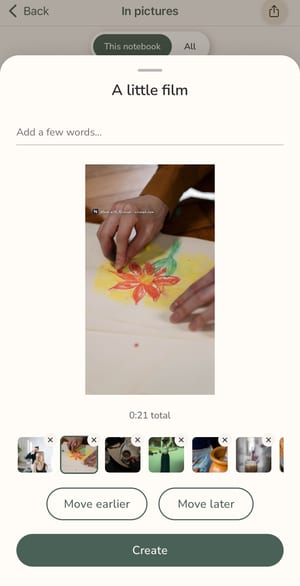
A little film, from photos and clips
A film can be a single photo, up to fifteen photos and short video clips. Photos rest for a moment and drift very slowly, clips play as they are, and each clip can be trimmed to the part that matters (at least two seconds). Add a few words under any of them. The film is a vertical 1080 by 1920 video, easy to send on any messaging app.
Calm by design
There is no music, no effects, no templates and no trending sounds. Films are silent. A film is meant to feel like a small handwritten card, not an edit. Around a minute is a comfortable length, and if yours runs longer, one quiet line tells you it will take a little longer to make.
Watch it, then decide
Before anything is saved or sent, the finished film plays in the app. You can share it, keep it, or change something and make it again, and you can stop while it is being made. Nothing is kept until it is finished.
Made to give
Think of a film for a grandmother who does not live nearby, a page of four photos for a friend after a weekend away, a single image with one sentence for someone's birthday. Everything carries a small mark at the corner: "Made with Niravah · niravah.com". It is always there, and it is the only thing we add.
What is free, what is Premium
Making images, photo pages and films is part of the free app, and your first notebook is free. Starting a new notebook is Premium, from €6.99 a month, €54.99 a year or €129.99 once. The free version shows a few ads, never on your day's page or where you write.
Questions
- How do I make a short video from my photos in Niravah?
- Open the share button, choose "A little film", pick your photos and video clips, add a few words if you like, and tap Create. You can watch it before you save or send it.
- Can I make a photo collage?
- Yes. "A few photos" brings two to five photos together on one page, and Niravah offers a few arrangements to choose from. It is saved as an image.
- Is there a watermark?
- Yes, a small "Made with Niravah · niravah.com" in the corner of everything you make. It is always on, and it is the only thing added.
- Does it need an account or an internet connection?
- No. Films and images are made on your phone, and Niravah works without an account. Your notebook stays on your phone by default.
Make something small for someone. Get Niravah, free on iOS and Android.